US Statutes MCP Server
Search the US Code, the CFR, and 56 state and territory statute codes (5.4M+ sections) from Claude, ChatGPT, Cursor, VS Code, and Windsurf.
For Cursor, VS Code and Windsurf, install the package instead: pip install vaquill-mcp
Building an application instead of wiring an editor? Use the Python or TypeScript SDK.


Connects through


 + your product
Vaquill AI Statute Tools via MCP
Every tool maps to a Vaquill AI API endpoint. The main ones are below.
search_us_statutesSearch the US Code, the CFR, and 56 state and territory codes. Filter by corpus, state, and title.
resolve_statute_citationResolve a Bluebook citation like 42 U.S.C. § 1983 straight to the section it names.
get_us_statute_sectionGet metadata for any section: citation, hierarchy, breadcrumb, and official source links.
get_us_statute_section_textGet the full text of any section in styled HTML and plain text.
list_statute_divisionsBrowse the statutory hierarchy one level at a time, in statutory order.
list_statutes_coverageCoverage matrix: which corpora exist in which jurisdiction, with per-corpus and per-status counts.
get_section_changesThe amendment timeline for a section, and what changed between two dates.
resolve_statute_citations_batchResolve many citations in one call, billed per citation.
list_session_lawsList one state's session laws, the acts as passed, by session, signing date or effective date.
get_session_lawOne act by id or citation: its dates, the code sections it changed, and its official sources.
get_session_law_bodyThe text of an act exactly as passed, including what it struck out.
create_watchWatch a body of law and get told when it changes. Plus list, update, test and delete.
get_pricingGet current API pricing (free, no authentication needed).
MCP Server Setup in 2 Minutes
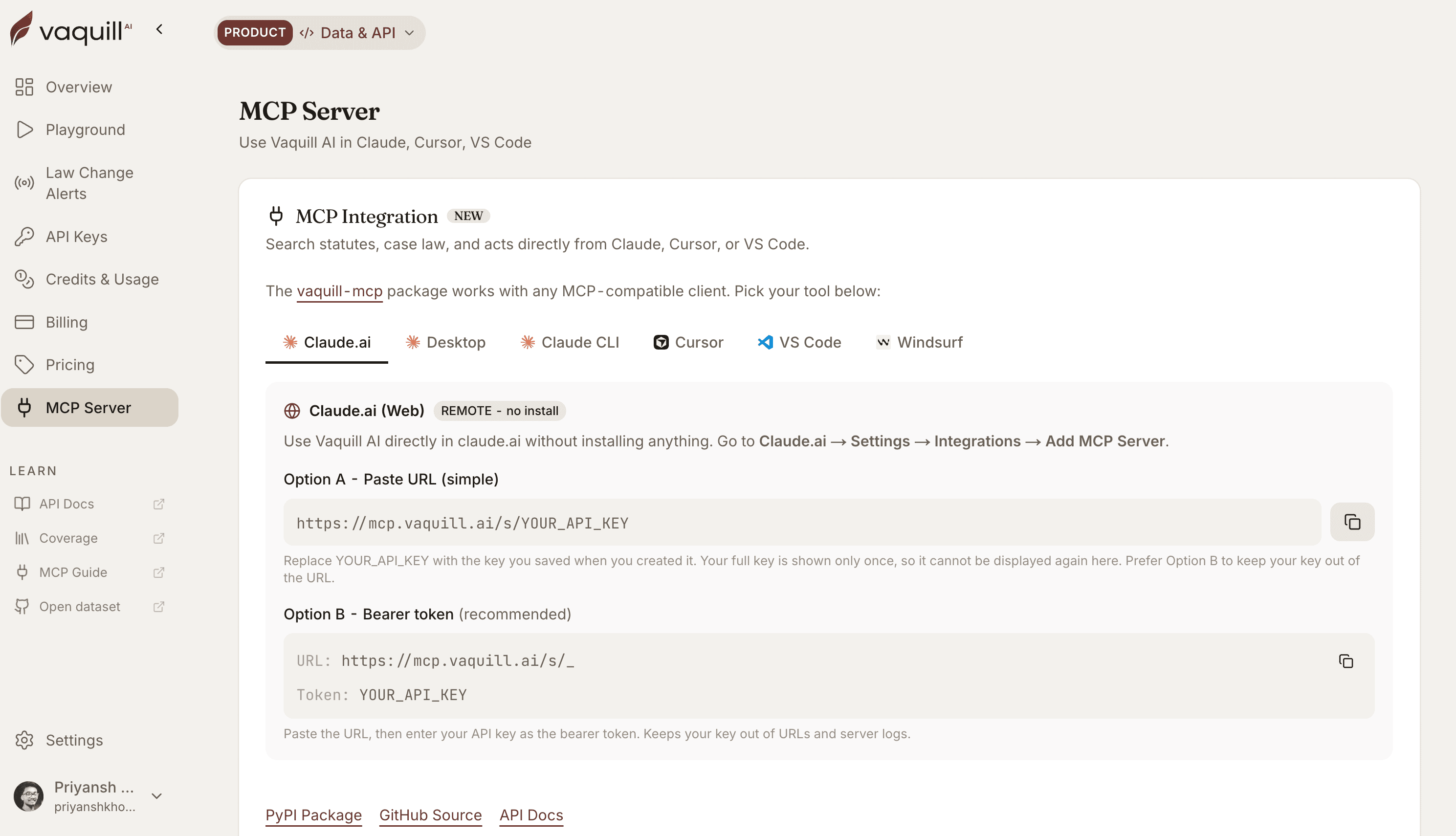
On Claude, paste one URL and click Connect: no API key needed. That is also the only setup that works in Cowork, whose cloud container cannot see a key on your machine. Everywhere else, get a key from app.vaquill.ai and paste the config for your tool.
# Sign in instead of pasting a key. Leave the API key
# and header fields empty: this URL uses OAuth.
URL:            https://mcp.vaquill.ai/mcp

# Click Connect, sign in, approve once. That is all.
# This is the only setup that works in Cowork, whose
# cloud container cannot hold a key from your machine.

# Prefer a key? That path is unchanged and still live:
URL:            https://mcp.vaquill.ai/s/_
Header name:    Authorization
Header value:   Bearer YOUR_API_KEY
// Settings > Developer > Edit Config opens this file.
// macOS ~/Library/Application Support/Claude/
// Windows %APPDATA%\Claude\
// Linux ~/.config/Claude/
// Quit Claude completely and reopen it. It does not reload.
{
  "mcpServers": {
    "vaquill": {
      "command": "uvx",
      "args": ["vaquill-mcp"],
      "env": {
        "VAQUILL_API_KEY": "vq_key_your_key_here"
      }
    }
  }
}# Remote with OAuth, no key to manage:
claude mcp add --transport http --scope user vaquill \
https://mcp.vaquill.ai/mcp
# then run /mcp and sign in.
# Or with an API key:
claude mcp add --transport http --scope user vaquill-key \
https://mcp.vaquill.ai/s/_ \
--header "Authorization: Bearer vq_key_your_key_here"
# Or the local package:
claude mcp add --scope user vaquill -e VAQUILL_API_KEY=vq_key_your_key_here \
-- uvx vaquill-mcp
# --scope user registers it for every project, not just this
# directory. -e keeps the key with the registration, so it
# survives Claude Code being launched from an IDE.{
"mcpServers": {
"vaquill": {
"command": "uvx",
"args": ["vaquill-mcp"],
"env": {
"VAQUILL_API_KEY": "vq_key_your_key_here"
}
}
}
}// For every project instead of one, run the
// "MCP: Open User Configuration" command and use the same
// shape. Restart the server after saving or the tools
// will not appear.
{
"servers": {
"vaquill": {
"type": "stdio",
"command": "uvx",
"args": ["vaquill-mcp"],
"env": {
"VAQUILL_API_KEY": "vq_key_your_key_here"
}
}
}
}{
"mcpServers": {
"vaquill": {
"command": "uvx",
"args": ["vaquill-mcp"],
"env": {
"VAQUILL_API_KEY": "vq_key_your_key_here"
}
}
}
}Then make one real call, because a green connection proves nothing: the server lists all 25 tools with no credential at all. Ask for “statutes coverage for California”. It costs 0 credits. Connector docs.
Environment Variables
| Variable | Required | Default |
|---|---|---|
| VAQUILL_API_KEY | Yes | - |
| VAQUILL_BASE_URL | No | https://api.vaquill.ai |
| VAQUILL_TIMEOUT | No | 120 |
Query US Statutes from Your AI Editor
Once configured, just talk to your AI assistant. It will automatically use the right Vaquill AI tools.
“Search the U.S. Code for Section 1983 civil rights claims”
“What does 42 U.S.C. § 1983 say?”
“Find Texas Penal Code sections on theft”
“Search the CFR for OSHA recordkeeping requirements”
“Get the full text of 50 U.S.C. § 3931”
“List the statute codes available for California”
How the Statutes MCP Server Works
Generated from the live spec
At startup the server fetches the API spec from Vaquill AI and generates its tools with FastMCP. Nothing is bundled, so new endpoints show up without a package update.
Self-serve
Generate a key in your dashboard and start calling. Your current usage and balance are shown there.
MCP Client: Connect External Tools to Vaquill AI
Bring your own MCP servers into Vaquill AI. Connect Notion, GitHub, Slack, or any MCP-compatible tool and use them directly in your AI chat alongside built-in statute research.
Add Server
Go to Settings > MCP Servers and add your server URL with optional auth headers.
Sync Tools
Click Sync to discover available tools. Preview parameters before enabling.
Enable Agent Mode
MCP tools are available when Agent Mode is enabled in chat.
Use in Chat
AI automatically calls your MCP tools alongside built-in statute tools.
Security
- SSRF protection against private IP ranges and loopback
- Auth headers encrypted at rest (AES-256-GCM)
- Prompt injection mitigation on tool results
- MCP tools cannot override built-in tools
Limits
- 10 servers per user, 10 tools per server
- 100 tool executions/hour, 5 sync requests/min
- Tool result size cap: 8,000 characters
- Streamable HTTP (recommended) or SSE transport
The US Statute Corpus, Right in Your Editor
Every section cited and linked to its official source, in the editor you already use. No data pipeline to build, no infrastructure to maintain.